
 https://www.elenascript.shop/
 Join our Discord
Elena Coin Market
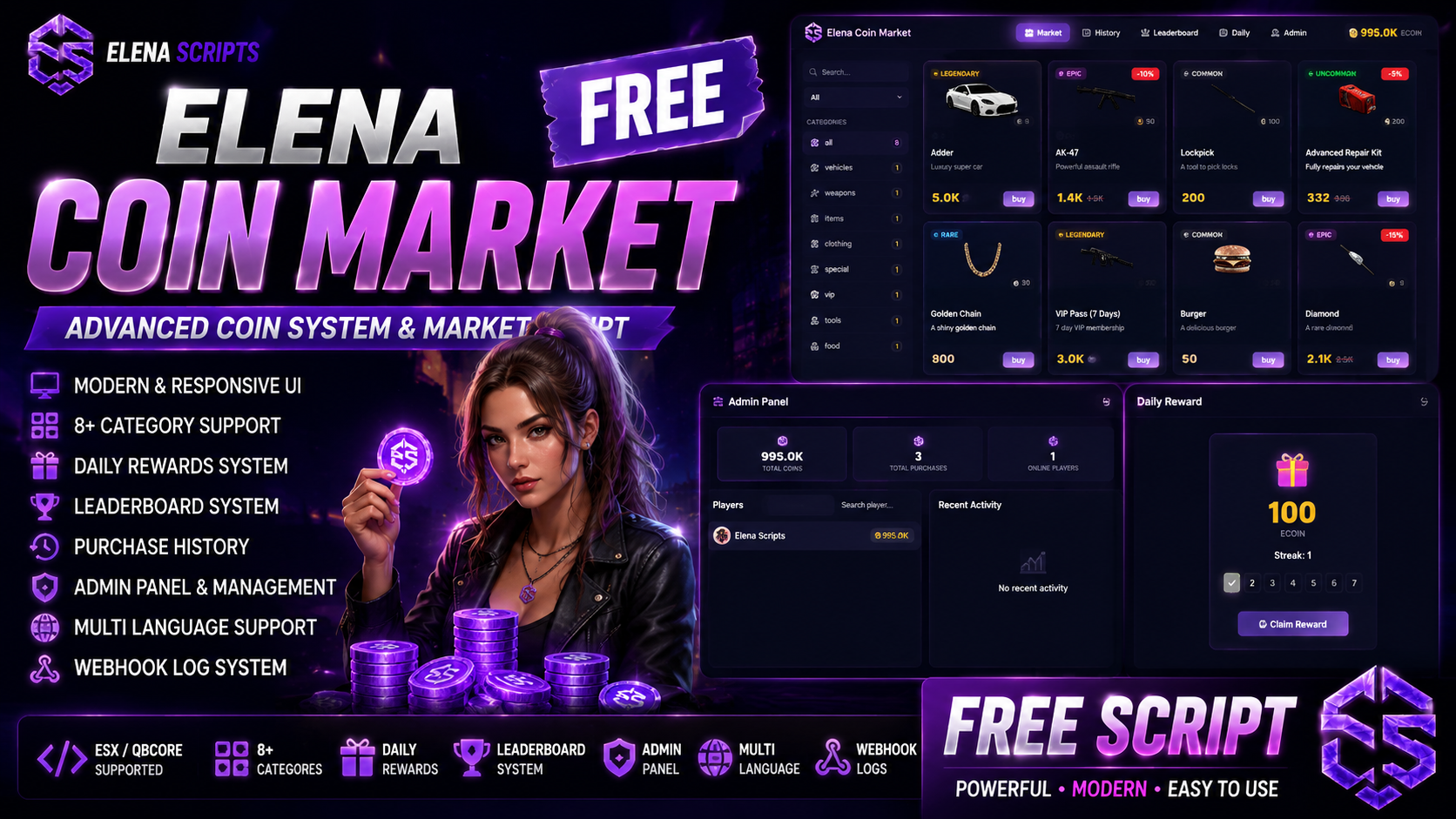
Elena Coin Market is a complete coin-based market system designed for FiveM servers. It allows server owners to create a fully customizable in-game store where players can spend coins to purchase vehicles, weapons, items, VIP packages and more. Everything is manageable through a simple config file with no coding required.
Why Elena Coin Market?
Most coin market scripts on the market are either too simple, poorly designed or overpriced. Elena Coin Market was built to change that. It offers premium-level features, a polished modern UI and full multi-framework support, all for free. Whether you run a small community server or a large public server, this resource adapts to your needs.
Framework Support
Elena Coin Market automatically detects your framework and adapts accordingly. No need to change code or install additional bridges.
Supported frameworks:
QBCore - Full support including garage save and inventory integration QBox - Full support with all features ESX - Full support with owned vehicles and inventory Standalone - Basic support with ox_inventory compatibility Market System
The market features a clean grid layout where players can browse items by category, search by name, filter by price or rarity and purchase with a single click. Every item displays its image, name, description, price, rarity tier, discount percentage and remaining stock.
Item images are automatically loaded from your inventory resource. Supports ox_inventory, qb-inventory, qs-inventory and core_inventory image paths. You can also use custom images for special items like vehicles.
Categories and Filtering
Items are organized into fully configurable categories. Default categories include vehicles, weapons, items, clothing, special, VIP, tools and food. Each category has its own Font Awesome icon and item count. Players can switch between categories instantly and combine with search and sort filters.
Sort options include price ascending, price descending, name A to Z, name Z to A and rarity based sorting.
Rarity System
Every item can be assigned a rarity tier that affects its visual presentation in the market.
Available tiers:
Common - Gray border and badge Uncommon - Green border and badge Rare - Blue border and badge Epic - Purple border and badge Legendary - Gold border and badge with glow effect Stock and Purchase Limits
Each item can have a limited stock that decreases with every purchase. When stock reaches zero the item shows as sold out and cannot be purchased. Stock data is saved in the database and persists across restarts.
Additionally each item can have a maximum purchase limit per player. For example you can allow each player to buy a specific vehicle only once.
Discount System
Items can have percentage-based discounts. The original price is shown with a strikethrough and the discounted price is displayed prominently. A discount badge appears on the item card showing the percentage off.
Reward Types
The market supports four reward types:
Item - Adds an inventory item to the player. Works with QBCore items, ESX items and ox_inventory.
Weapon - Gives a weapon to the player. Framework-aware, uses the correct method for each framework.
Vehicle - Spawns the vehicle in front of the player and saves it to the garage database. Works with QBCore player_vehicles table and ESX owned_vehicles table.
Custom - Triggers a custom server event with configurable data. Perfect for VIP packages, permissions or any custom reward logic.
Admin Panel
Server administrators can access the admin panel through the /coinadmin command or by opening the market with admin permissions. The admin panel includes:
Player Management - View all online players with their current coin balance. Search players by name or ID. Click any player to modify their coins.
Coin Operations - Add coins, remove coins or set a specific amount for any online player. All operations are instant and reflected in real time.
Statistics - View total coins in circulation, total purchases made and current online player count.
Activity Log - Track all recent activities including purchases, admin coin additions, admin coin removals and admin coin sets. Each entry shows the player name, action details and timestamp.
Admin access is controlled through ACE permissions. The system checks for group.admin, group.god, group.superadmin, qbcore.god and custom ACE permissions.
Daily Reward System
Players can claim a daily coin reward every 24 hours. The system includes a streak mechanic where consecutive daily logins increase the reward amount.
Features:
Configurable base reward amount Streak bonus with customizable multiplier Visual streak dots showing progress Maximum streak cap Automatic streak reset on missed days Database persistent, survives restarts Leaderboard
The leaderboard ranks players by their coin balance. It features a podium display for the top 3 players with avatar initials, crowns and animated entrance effects. Players ranked 4th and below are shown in a scrollable list.
A mini leaderboard is also displayed on the right sidebar of the market page for quick reference while browsing items.
Purchase History
Every purchase is recorded and displayed in a clean table format. Players can view the date, item name and price of each transaction. History is sorted by most recent first and stored permanently in the database.
Discord Webhooks
All important actions can be logged to a Discord channel through webhooks. Configurable log types include:
Player purchases Admin coin additions Admin coin removals Admin coin set operations Each webhook message includes player name, action details, amounts and timestamps in a clean embed format.
Database
Elena Coin Market uses MySQL through oxmysql for persistent data storage. The database structure includes:
Player coin balances and statistics Purchase history with timestamps Item stock tracking Per-player purchase count tracking Daily reward streak data All data is cached in memory for performance and periodically saved to the database. Auto-save interval is configurable.
Exports
Other resources can interact with the coin system through server-side exports:
GetPlayerCoins - Returns a player current coin balance AddPlayerCoins - Adds coins to a player RemovePlayerCoins - Removes coins from a player SetPlayerCoins - Sets a player coins to a specific amount This allows integration with jobs, minigames, events or any other resource that needs to reward or charge coins.
User Interface
The UI is built with a modern dark theme featuring smooth animations, clean typography and Font Awesome icons throughout. No emojis are used anywhere in the interface.
Design highlights:
Gradient accents on headers and borders Card hover effects with elevation Animated page transitions Notification system with progress bars Modal confirmations with item previews Skeleton loading states Category sidebar with active indicators Coin balance display with animation on change Responsive scrollbars matching the theme Close button with rotation animation The entire color scheme is configurable from config.lua allowing you to match the market to your server branding.
Language Support
All UI text is translatable through the locale system. Add new languages by creating entries in the locales file. The active language is set in the config.
Configuration
Everything is controlled from a single config.lua file:
Framework selection Language selection Coin name and icon Default and maximum coin values Admin permissions Keybinds and commands Webhook settings Inventory image paths UI colors Categories Market items with all properties Daily reward settings Notification settings Leaderboard player count Auto-save interval Installation
Download and extract to your resources folder Import the SQL file into your database Edit config.lua to match your server Add admin permissions to server.cfg Add ensure elena_coinmarket to server.cfg Restart your server Requirements
oxmysql QBCore, QBox, ESX or standalone setup Font Awesome 6 loaded via CDN in the HTML This resource is free. No payment required. No escrow. Fully open source. Use it, modify it, make it yours.
If you enjoy this resource please consider leaving a review and sharing it with other server owners.
Made by Elena Scripts.